
Xilisoft iPod Video Converter
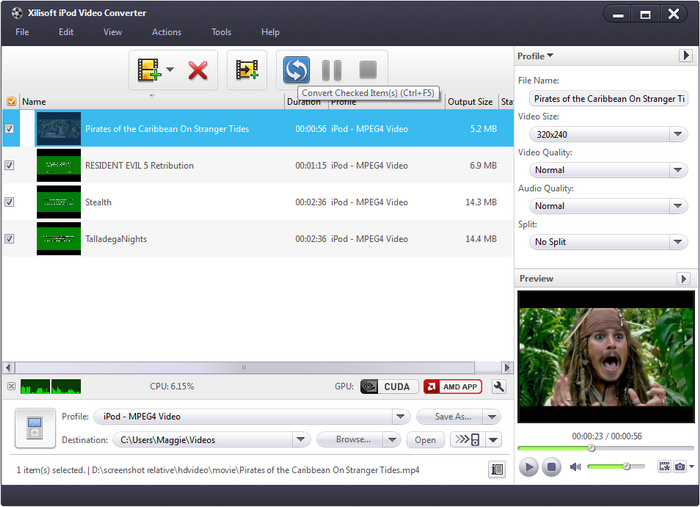
Having problems with movie and music files not compatible with your iPod? With Xilisoft iPod Video Converter, you are now able to watch popular video formats such as AVI, MPEG, WMV, DivX, MKV, MOV, RM, and VOB, or listen to MP3, M4A, AAC, WAV, WMA, MP2, AC3, RA, and APE audio files on your iPod or iPhone.
Equipped with extensive features, the iPod Video Converter allows you to split file by preset size or time, set multiple output formats on one file, or transform a file into a preset size to fit your iPod.
- Convert video files to iPod (MP4) format
- Convert video/audio to iPod music (MP4, WAV, M4A)
- Support all types of iPod and iPhone devices
- Able to transfer outputted files to iPod or iTunes directly
- Support NVIDIA CUDA & ATI Stream technology


Safe Download 100% Virus Free

Secure Online Payment

30 Days Money Back Guarantee

Free Customer Service
Customers Also Choose:
Xilisoft iPhone Magic Platinum
Complete solutions to transfer, backup and manage iPhone/iPad/iPod contents, convert videos and download online videos to iPhone/iPad/iPod.
Xilisoft Video Converter Ultimate
Convert common and HD/3D videos in 160+ formats. Merge, clip, split, add video effects, watermark, subtitle, soundtrack, etc to better enjoy it.

- iPod video converter and iPod music converter
The iPod video converter can easily convert AVI, MPEG, WMV, DivX, MOV, RM, VOB and such video formats to iPod video MP4, or convert to iPod music MP3, M4A, WAV from multiform audios like MP3, WAV, WMA, RA, OGG, AAC, AC3, MP2, and then enjoy! - Video/Audio to iPod Transfer
After conversion, Xilisoft iPod Video Converter also can transfer the outputted files to iPod automatically, easy and fast. - High conversion speed
Detecting CPU automatically and supporting multi-core CPU for each task, this iPod video converter offers you the highest video to iPod conversion speed. - Support NVIDIA CUDA & ATI Stream Acceleration Technology
You will gain 5X conversion speed in this iPod video converter with NVIDIA CUDA & ATI Stream acceleration technology.

Rich video iPod converter options to vary output files 
Varying your output is made simple by the aid of the iPod video converter
- Convert one to several iPod video files simultaneously
Stop wasting time to set one format and click to output, and repeat and repeat, now just set diverse profiles for one source simultaneously to convert to iPod videos and music in one step using this iPod video converter. - Output files with file size you want
The output files can be optimized in a size that plays best for your iPod: split one file into several by setting split time or size, or customize the file size accurately using the Bitrate calculator tool. - Convert any segment
It's simple to only convert the segment you want with this video iPod converter: just set the start point and duration as you wish to remove the unwanted for output. - More assorted settings
Divided into general and advanced settings for iPod video and audio conversion, all the settings are convenient for anyone: novices can just keep the default, while pros can adjust the advanced and even expert-level settings freely to meet multiple needs.

Easier, quicker and handier to convert video to iPod
Make you convert video to iPod video and audio easier with better experience
- Transfer to iPod Directly
Ability to transfer the outputted files to iPod directly after iPod video conversion. - Easier and quicker
Concise interface and batch conversion supported in this iPod video converter make your iPod video conversion easier and quicker. - Run in background
You're allowed to run this iPod video converter in background to lower its priority and get more resources to run other programs. - Action After ConversionSet an action (hibernate, standby, shutdown or exit) and let the software do it automatically after a conversion is done, so you need not waste time waiting for it.
- Preview and SnapshotPreview video files with the built-in resizable player with 4:3 and 16:9 zoom modes (which can also used as a stand-alone player) ; take a snapshot of a scene you like and save as picture file.
- Power Management
Allows you to manage your system power in this iPod video converter. - Changeable Interface LanguageChange the language to German, English, Japanese, Spanish, French or Chinese.
| Output Device Support | |
| iPad, iPad mini, iPad Air, iPad Pro (12.9/9.7/10.5/11 inch), iPod nano/mini/shuffle/classic/touch, iPhone 3G/3GS/4/5/5S/5C/SE/6/6S/7/8/X/XS/XR/11/12/13/14/15 Series. Android mobile devices: Samsung Galaxy Note II (n7100), Samsung Galaxy S III (i9300), Samsung Galaxy S II (i9100), LG Optimus 4X HD (P880), LG Optimus 2X (P990), HTC DROID DNA (X920), HTC EVO 4G LTE (ONE X), HTC ONE V, Motorola DROID RAZR MAXX HD, Motorola Photon Q ,Sony Xperia TL (LT30), Sony Xperia S (LT26), Sony Xperia P (LT22) Google mobile devices: Google Nexus 4 Windows mobile devices: Nokia Lumia 920, Nokia Lumia 820, HTC Windows Phone 8X, HTC Radar 4G, Samsung Focus S | |
| Input File Format Support | |
| Video | AVI, MPEG, WMV, MP4, FLV, MKV, H.264/MPEG-4, DivX, XviD, MOV, RM, RMVB, M4V, VOB, ASF, 3GP, 3G2, SWF, H.261, H.264, DV, DIF, MJPG, MJPEG, DVR-MS, NUT, QT, YUV, DAT, MPV, NSV AVCHD Video (*.mts, *.m2ts), H.264/MPEG-4 AVC (*.mp4), MPEG2 HD Video (*.mpg; *.mpeg), MPEG-4 TS HD Video (*.ts), MPEG-2 TS HD Video (*.ts), Quick Time HD Video (*.mov), WMV HD Video (*.xwmv), Audio-Video Interleaved HD Video (*.avi) |
| Audio | MP3, WMA, AAC, WAV, CDA, OGG, FLAC, APE, CUE, M4A, RA, RAM, AC3, MP2, AIFF, AU, MPA, SUN AU Format |
| Output File Format Support | |
| Video | MPEG, MP4, MPEG-4, MOV |
| Audio | MP3, AAC, WAV, M4A, AIFF |
| Image | BMP, GIF, JPEG, PNG |
| OS | Microsoft® Windows 11 / 10 / 8 / 7 / Vista / XP (SP2 or later) |
| Processor | 1GHz Intel/AMD processor or above |
| RAM | 256MB RAM (512MB or above recommended) |
| Free Hard Disk | 100MB space for installation |
| Graphic Card | Super VGA (800×600) resolution, 16-bit graphics card or higher |


